
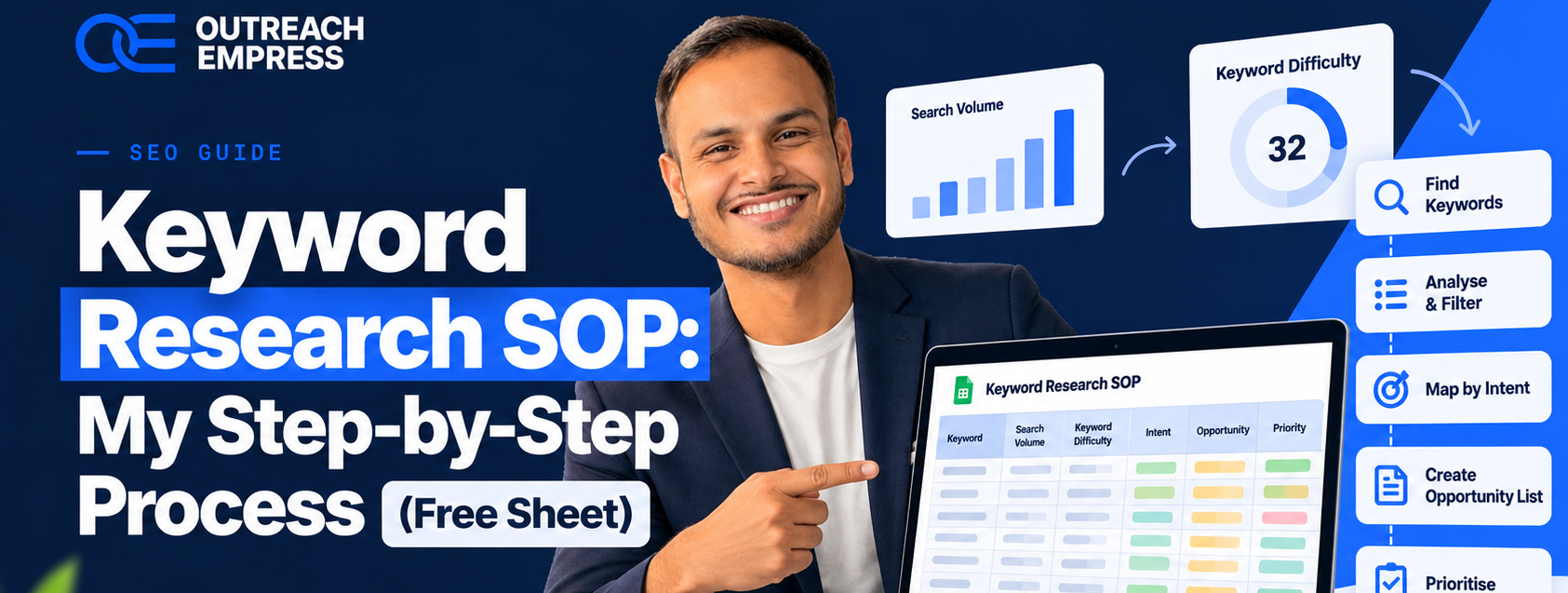
This is the 24-step process I use to pick keywords for client sites at Outreach Empress. Follow it in order and you end up with a keyword plan where every keyword has a page, a funnel stage and a realistic chance of ranking.
Most of it is standard keyword research. Steps 16 and 17 are the part I add: I check the lowest-DR site ranking in the top 10 in Ahrefs to see the real competition, then copy what that site did. That one check has saved clients more money than any keyword tool score.
How to use this post:
- Make a copy of the free sheet (link at the end). The SOP tab has every step from this post, and the Template tab is where you do the work.
- Each step has what to do, the tool, and a box of text you can copy straight into that tool.
- Do the stages in order. Skipping the intent check or the DR check is where most keyword plans go wrong.
Stage 1: Setup
Step 1: Write down the business goal and the money pages
Every keyword you pick later has to lead to one of these pages. A keyword with no page to send people to is traffic you can’t use.
- List what the site sells: products, services, or both.
- List every page that takes money or leads: product pages, service pages, pricing, booking or contact pages.
- Mark which of these pages exist today and which are missing.
- Write one line for the goal, for example: more booked calls for the Klaviyo service.
Tool: The Template tab of the sheet
Copy and paste:
Goal:
What we sell:
Money pages that exist:
Money pages that are missing:
Step 2: Connect Google Search Console
Search Console shows the real searches people already use to find you. No paid tool has that data.
- Go to Search Console and add your site as a Domain property.
- Verify it with the DNS record your domain host gives you.
- If the site is new, wait a few days for data before step 5.
Tool: Google Search Console
Copy and paste:
https://search.google.com/search-console
Stage 2: Search intent
Step 3: Run the intent test on your main keyword
Google has already tested what searchers want for this keyword. If the top 10 are all buying guides, a product page won’t rank there.
- Open an incognito window so your history doesn’t change the results.
- Search your main keyword using the URL below, with your country code.
- Write down what type of page holds each of the top 10 spots: blog post, product page, service page, listicle, video, tool or directory.
- The type that wins most spots is the intent. Your page has to be that type.
Tool: Google (incognito)
Copy and paste:
https://www.google.com/search?q=YOUR+KEYWORD&gl=us&hl=en&pws=0
Step 4: Label each keyword with one of the four intents
Intent tells you which page type and which funnel stage a keyword belongs to.
- Informational: the searcher wants to learn (how to train a puppy).
- Commercial: they are comparing options before buying (best dog training classes).
- Transactional: they are ready to buy (dog training classes near me sign up).
- Navigational: they want one brand (petsmart dog training).
- Use what ranks from step 3 to decide, not the label your keyword tool gives.
Tool: The Intent column in the sheet
Copy and paste:
Informational | Commercial | Transactional | Navigational
Stage 3: Find keyword ideas
Step 5: Pull your existing queries from Search Console
These are searches Google already connects to your site. A page on position 14 needs less work than a page that doesn’t exist.
- In Search Console open Performance, then Search results.
- Set the date range to the last 16 months.
- Turn on Average position and open the Queries tab.
- Export to Google Sheets.
- Use the formula below to list queries sitting in positions 11 to 30. These are your fastest wins.
Tool: Google Search Console
Copy and paste:
=FILTER(A2:E, E2:E>10, E2:E<=30)
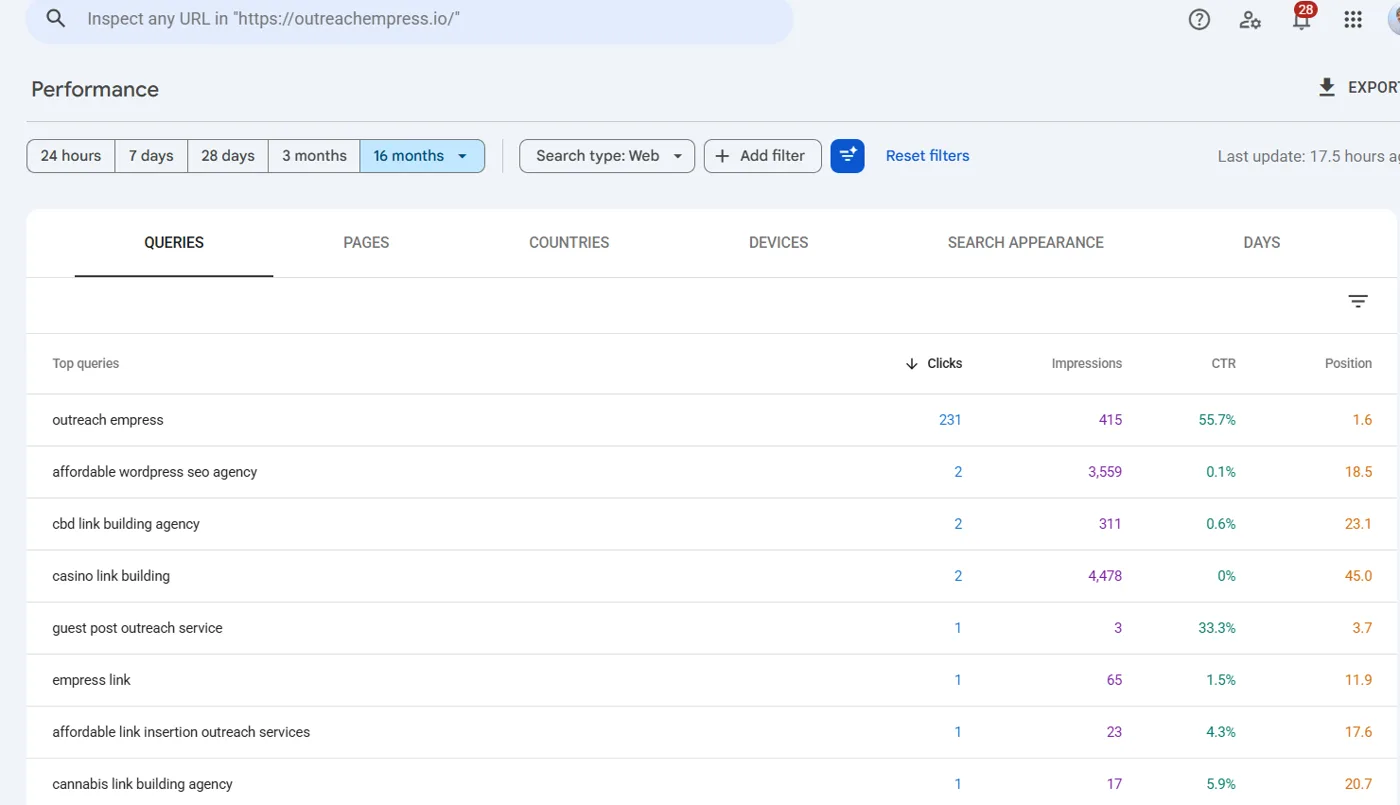
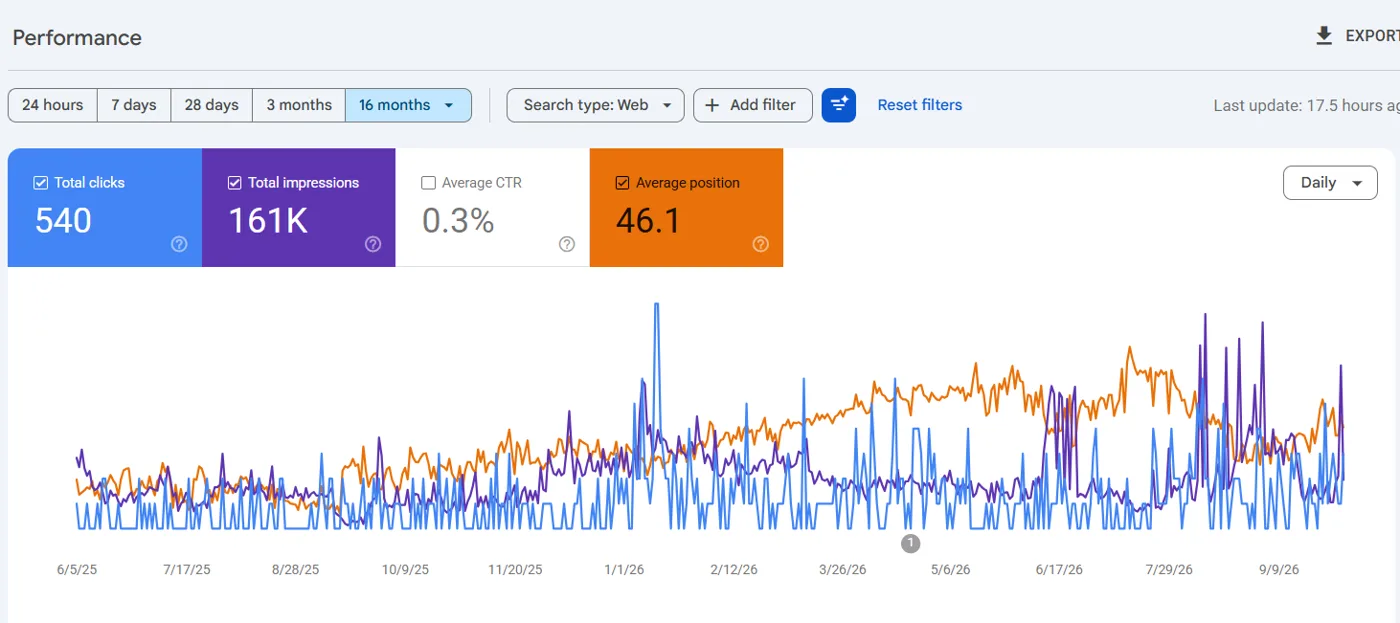
In this example, “casino link building” has 4,478 impressions at position 45 and “affordable wordpress seo agency” has 3,559 at position 18.5. Both already get seen in Google, so they are better starting points than a keyword the site doesn’t rank for at all.
Step 6: Collect Google autocomplete suggestions
Autocomplete only shows searches real people make, so every suggestion has some demand behind it.
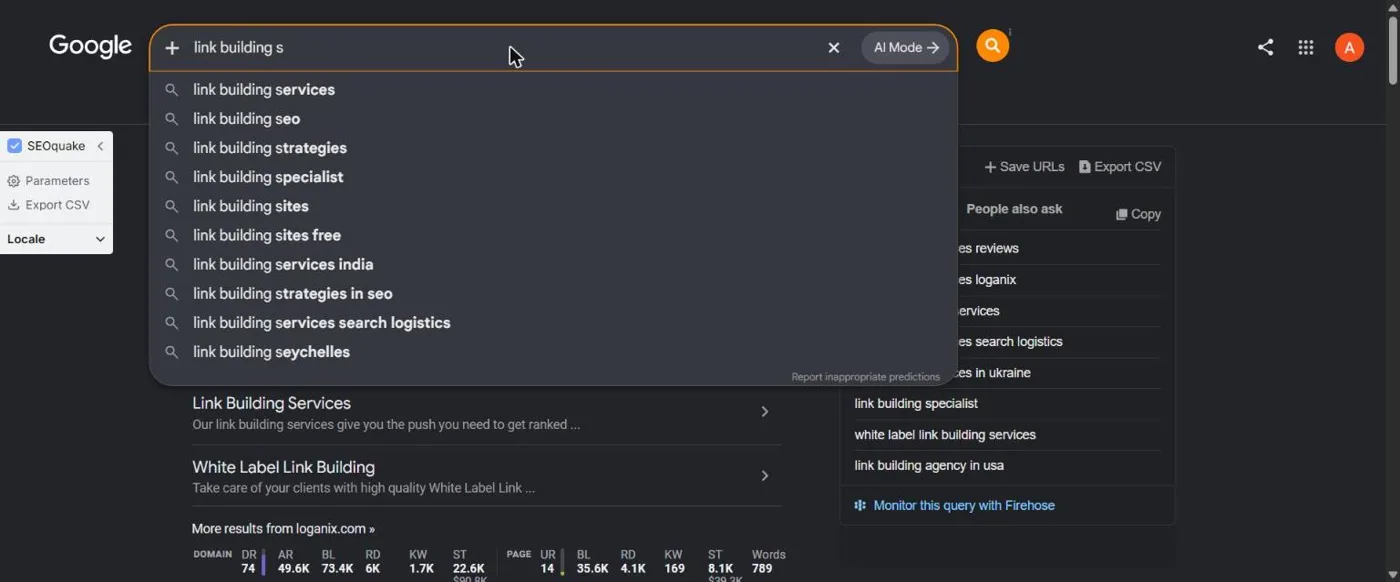
- Type your seed keyword into Google slowly and note every suggestion.
- Repeat with a letter after the keyword: a, b, c and so on.
- Repeat with question words in front: how, what, best, why.
Tool: Google
Copy and paste:
YOUR KEYWORD a
YOUR KEYWORD b
how YOUR KEYWORD
best YOUR KEYWORD
YOUR KEYWORD vs
Step 7: Mine the People Also Ask box
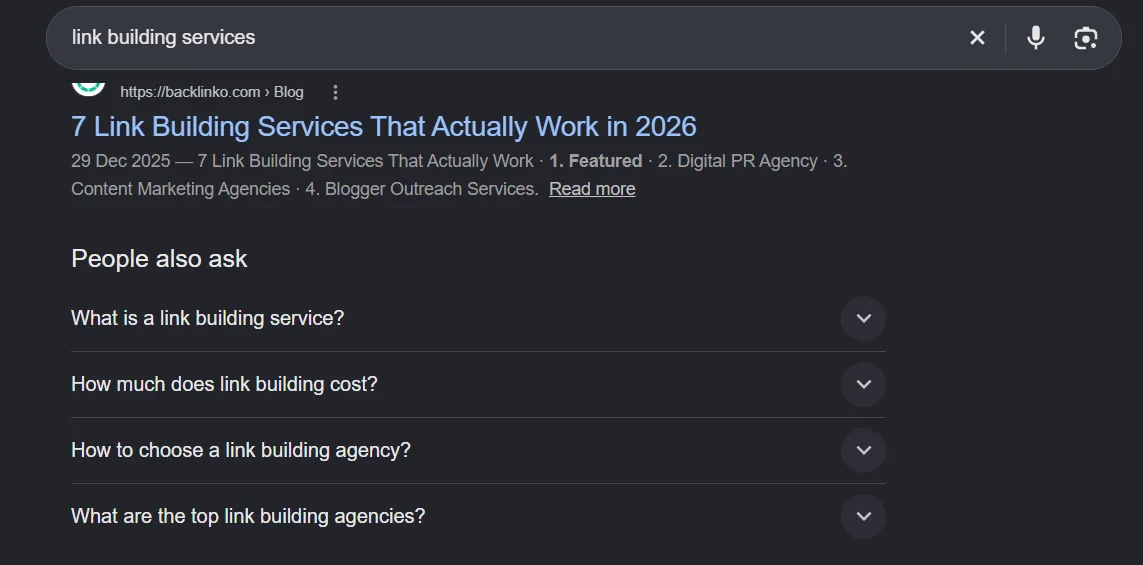
Each question is a search people make and a possible H2 or FAQ for your page.
- Search your seed keyword and find the People Also Ask box.
- Click three or four questions. Each click loads more questions.
- Copy every question that fits what you sell into the sheet.
Tool: Google
Step 8: Note the related searches at the bottom of the page
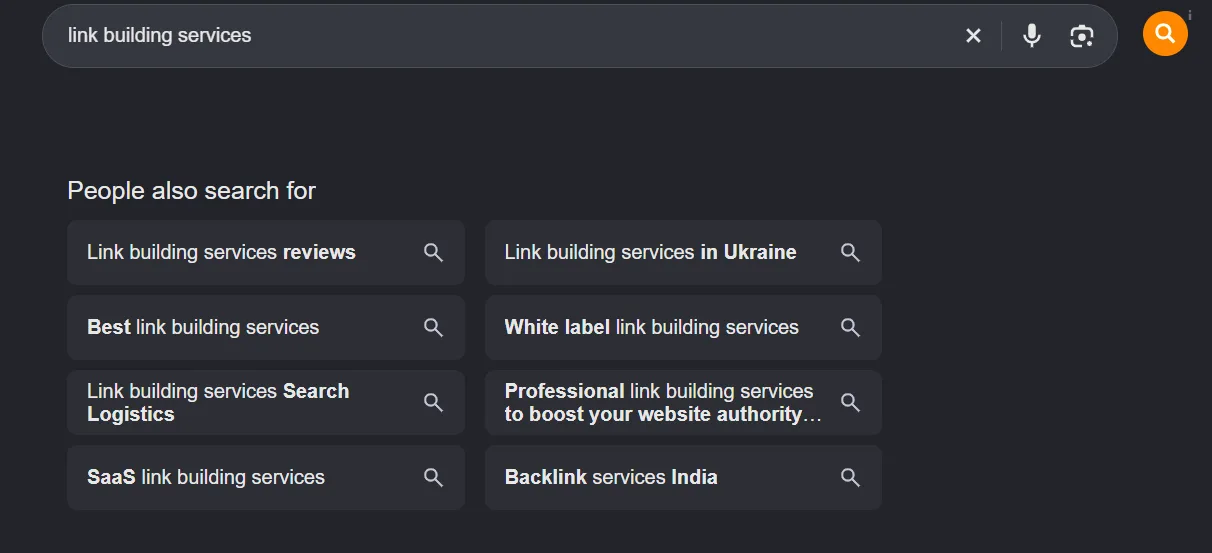
This is Google showing you the other searches people make around your topic.
- Scroll to the bottom of the results page.
- Copy the searches listed under People also search for or Related searches.
- Click one and repeat to go a level deeper.
Tool: Google
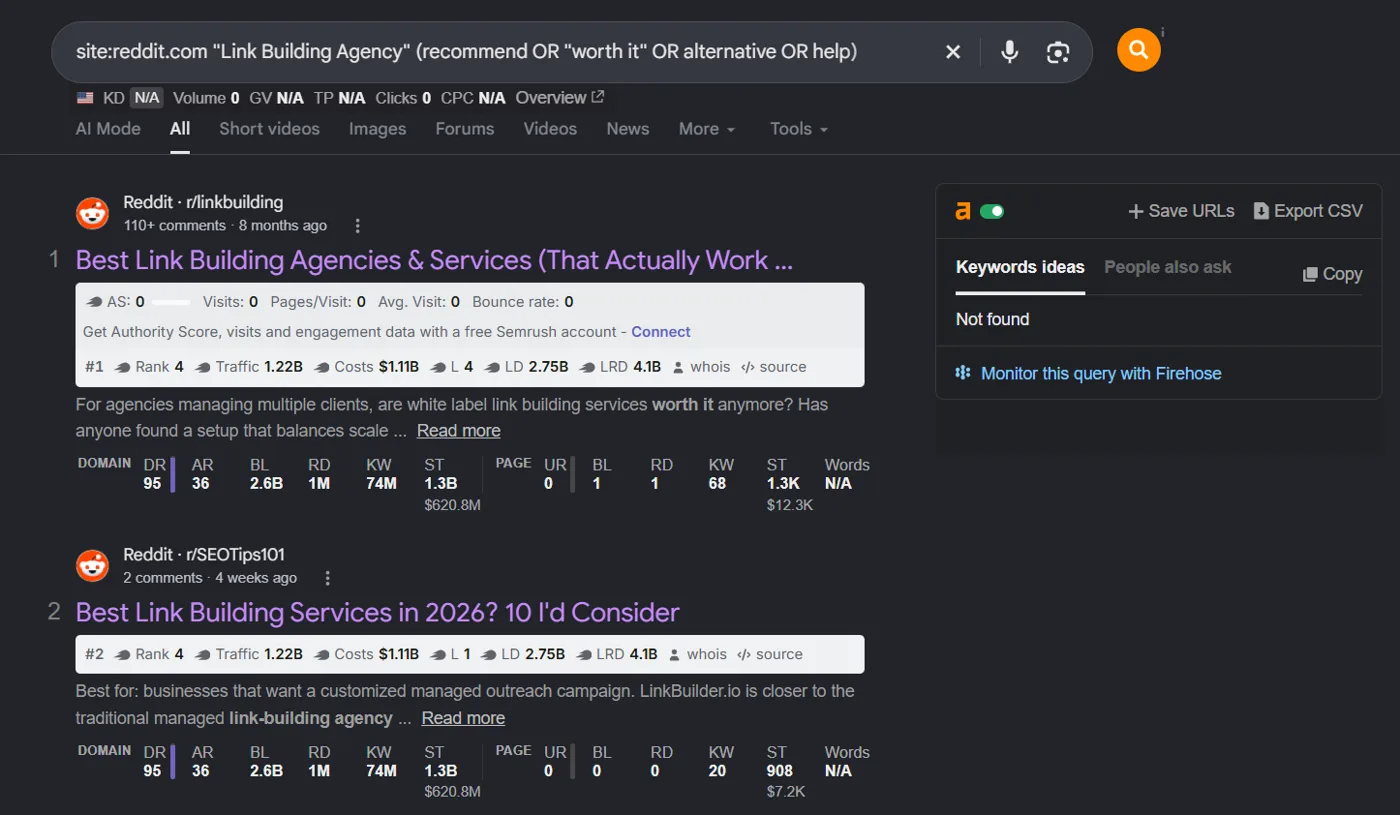
Step 9: Read how buyers describe the problem on Reddit
You get the buyer’s own wording, which tools and brainstorms miss.
- Search Google with the operator below, using your topic.
- Open threads where people ask for recommendations or complain about a problem.
- Copy the exact phrases they use. People often type the same words into Google.
Tool: Google + Reddit
Copy and paste:
site:reddit.com "YOUR TOPIC" (recommend OR "worth it" OR alternative OR help)
Step 10: Find gaps in your own site with ChatGPT
It shows topics a site like yours is expected to cover that you haven’t written about yet.
- Open your sitemap. It is usually at /sitemap.xml or /sitemap_index.xml.
- Copy the list of URLs.
- Paste it into ChatGPT with the prompt below.
Tool: ChatGPT or Claude
Copy and paste:
Here are the URLs on my website. My business sells [WHAT YOU SELL] to [WHO YOU SELL TO] in [COUNTRY]. List the topics and pages a site like mine should have but is missing. Group them by funnel stage: buying, comparing, learning.

[PASTE URLS]
Step 11: Do the same with a competitor’s sitemap
Shows what a competitor covers that you don’t.
- Open a competitor’s sitemap the same way.
- Paste both URL lists into ChatGPT with the prompt below.
Tool: ChatGPT or Claude
Copy and paste:
List A is my site's URLs. List B is my competitor's URLs. List the topics in B that have no matching page in A. Ignore blog tags, author pages and legal pages.

List A:
[PASTE]

List B:
[PASTE]
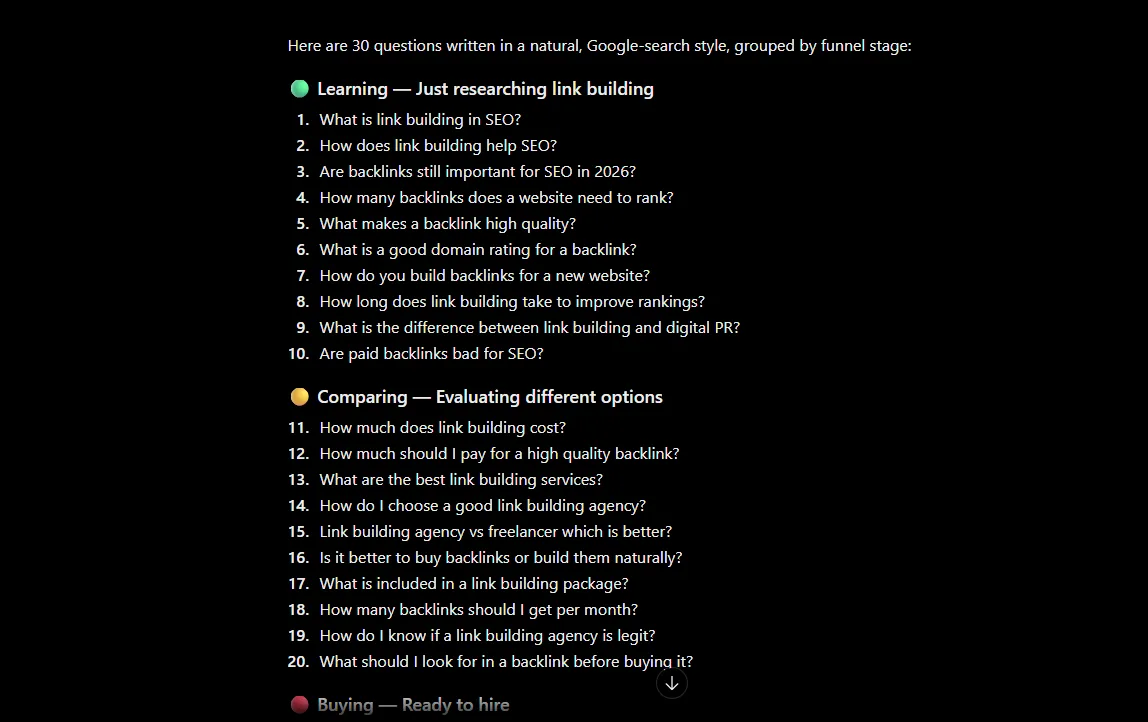
Step 12: Ask AI for the questions buyers ask before they buy
A seed list in 15 seconds. Treat it as ideas, not data, until the volumes come back.
- Paste the prompt below into ChatGPT.
- Add the useful questions to your keyword list. You will check their volume in step 14.
Tool: ChatGPT or Claude
Copy and paste:
Give me 30 questions someone asks before buying [YOUR PRODUCT OR SERVICE]. Write them the way a person would type them into Google. Mix questions from people just learning about it, people comparing options, and people ready to buy.
Step 13: Pull your competitors’ ranking keywords in Ahrefs
These are keywords already proven to bring traffic to a site like yours.
- In Ahrefs open Site Explorer and enter a competitor’s domain.
- Open Organic keywords and set your target country.
- Filter Position from 1 to 10.
- Export and add the relevant keywords to your list.
Tool: Ahrefs Site Explorer > Organic keywords
Copy and paste:
Filters: Country = your target country | Position = 1 to 10 | Volume = from 20
Stage 4: Validate the keywords
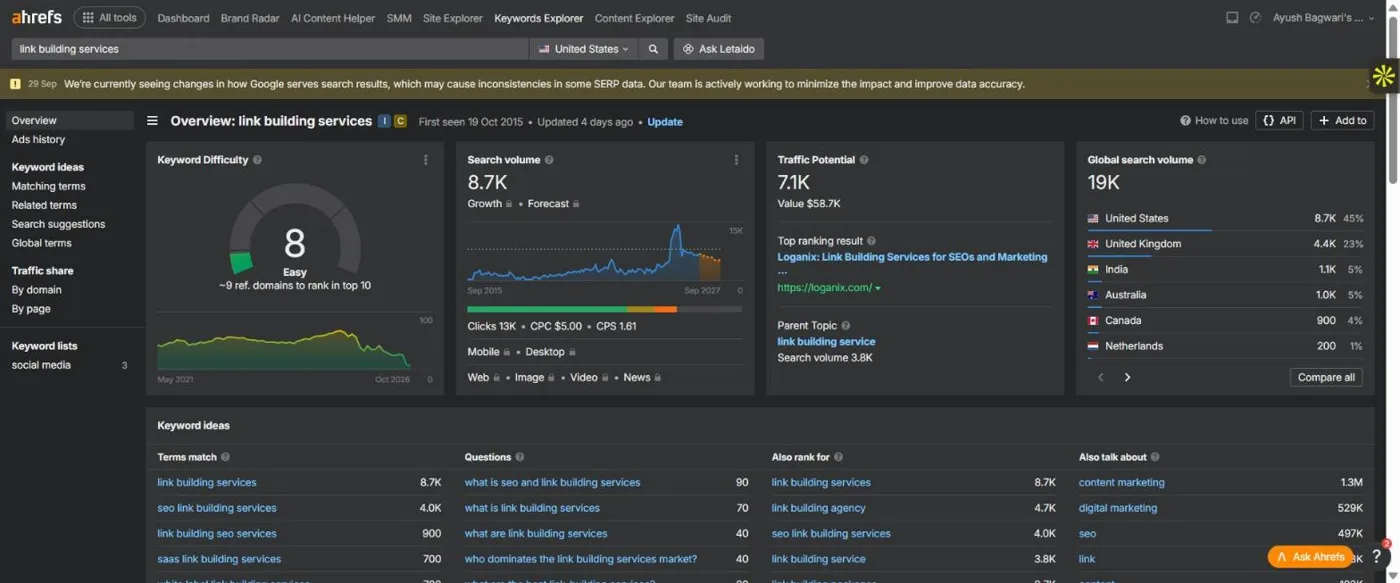
Step 14: Get volume, keyword difficulty and intent for every idea
Ideas are cheap. This is where you find out which ones people actually search.
- In Ahrefs open Keywords Explorer.
- Paste your full keyword list and choose your target country.
- Export the results to the sheet: keyword, volume, KD, CPC and parent topic.
- Delete duplicates.
Tool: Ahrefs Keywords Explorer (DataForSEO or SE Ranking work too)
Copy and paste:
Columns to keep: Keyword | Volume | KD | CPC | Parent topic
Step 15: Score each keyword on demand, fit, intent and difficulty
Few keywords score well on all four. The ones that do go to the top of the list.
- Demand: does anyone search it? Drop keywords with almost no volume unless they are very close to a sale.
- Fit: does it match something you sell, and which funnel stage is it?
- Intent: can your page type satisfy what ranks (from step 3)?
- Difficulty: can you realistically rank? Step 16 answers this properly.
- Cut any keyword with no page it could lead to a sale on.
Tool: The sheet
Copy and paste:
Keep if: volume > 0 AND it fits a money page or a cluster AND your page type matches the SERP
Step 16: Find the lowest-DR site in the top 10 with Ahrefs (my method)
KD is an average of the whole page. One weak site ranking in the top 10 proves Google will rank a small site for this keyword. I learned this the expensive way: a cannabis client lost about $13k in 2023 chasing “CBD gummies” against a much bigger brand because the KD looked fine.
- In Ahrefs Keywords Explorer, open the keyword and scroll to SERP overview.
- Look at the DR column for the 10 organic results. Skip ads, People Also Ask and other SERP features.
- Write down the lowest DR you see. That is the real competition, not the KD score.
- Compare it with your own DR. If a site with DR 15 or lower is in the top 10, the keyword can be won on a small link budget.
- If the lowest DR is well above yours, the keyword waits until you have more links.
- In the sheet, put your DR in B3 and the lowest DR for each keyword in column J. The formula below gives the gap: zero or above means go, below zero means links first.
Tool: Ahrefs Keywords Explorer > SERP overview (free option: Ahrefs Website Authority Checker, one domain at a time)
Copy and paste:
=IF(J6="","",$B$3-J6)
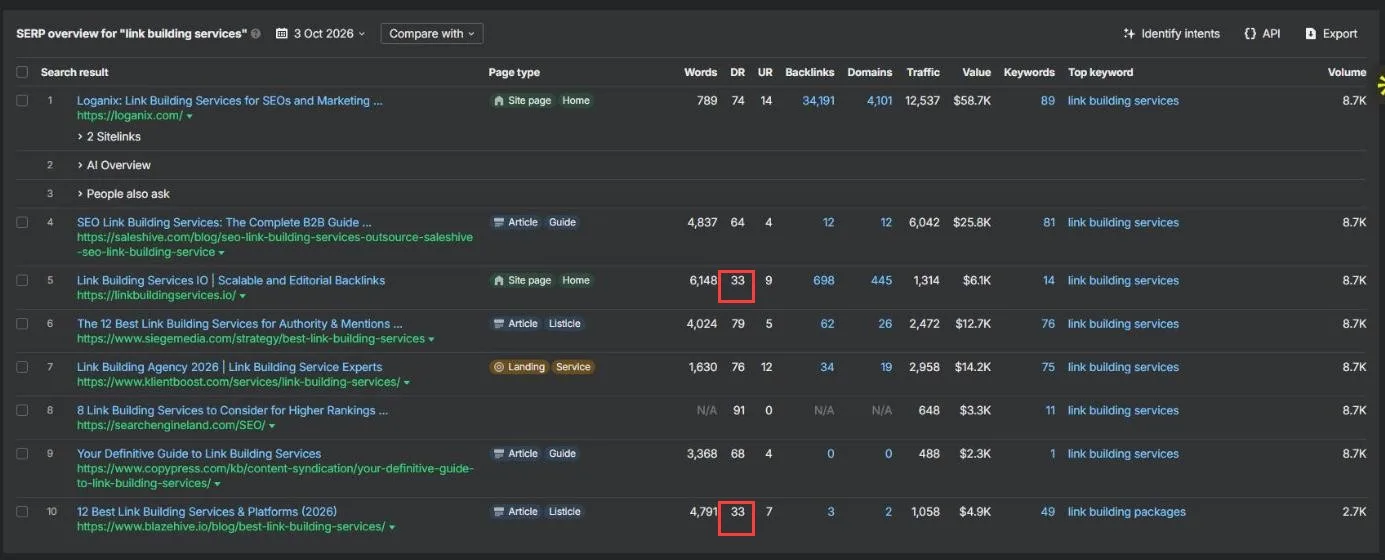
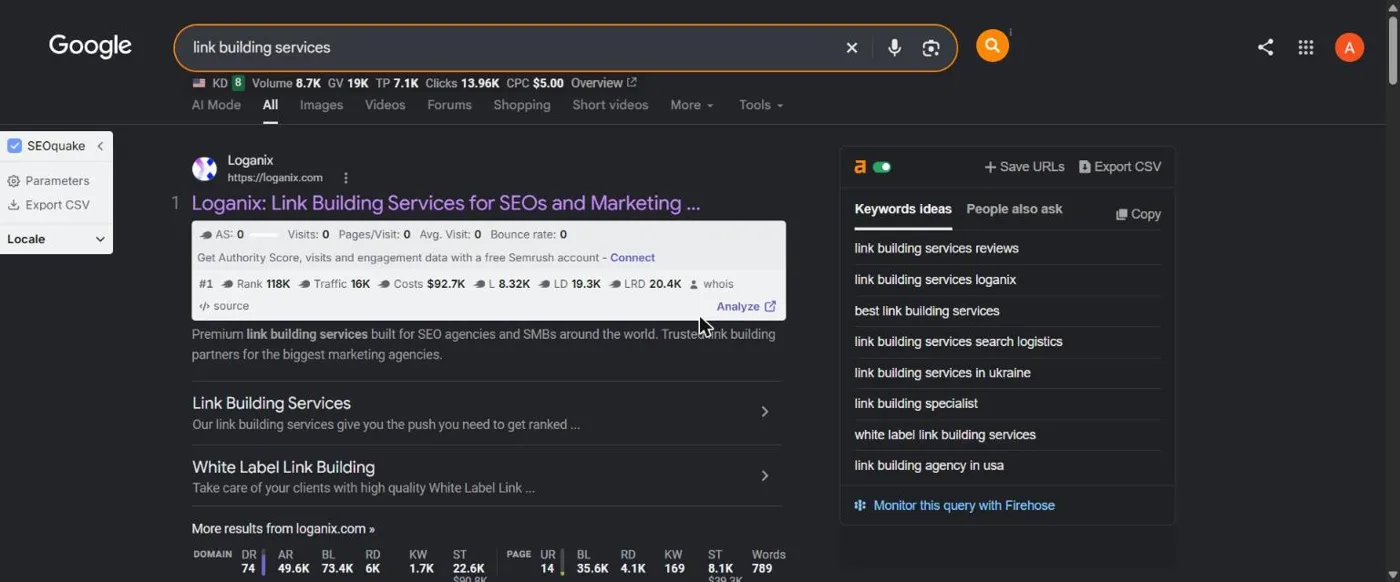
In this example, linkbuildingservices.io (position 5) and blazehive.io (position 10) both rank with DR 33, while the KD score shows 8. A site at DR 33 or above has a real shot at this keyword. A DR 15 site would need links first.
Step 17: Reverse-engineer the low-DR site that ranks (my method)
Copying the top 3 results tells you what big sites do. Copying the weakest site that still ranks tells you the minimum that works, which is the plan a smaller site can afford.
- Copy the ranking URL of that low-DR site into Ahrefs Site Explorer.
- Organic keywords: which other keywords does this page rank for? Add the good ones to your list.
- Top pages: which of their pages bring the most traffic?
- Page structure: note the headings, length and what the page covers.
- Internal links: which of their pages link to it, and with what anchor text?
- Backlinks and Referring domains: where do its links come from? Count how many are guest posts and how many are link insertions in existing articles.
- Anchors: what share is branded, exact match and generic?
Tool: Ahrefs Site Explorer: Organic keywords, Top pages, Internal links, Backlinks, Anchors
Copy and paste:
Low-DR site URL:
DR:
Other keywords it ranks for:
Page type and length:
Internal links pointing to it:
Referring domains:
Guest posts vs link insertions:
Anchor mix (branded / exact / generic):
Stage 5: Cluster
Step 18: Group keywords that belong on the same page
One page can rank for a whole group. Writing a page for each keyword splits them against each other.
- Sort the sheet by Ahrefs’ Parent topic column. Keywords with the same parent topic usually belong together.
- For close calls, search both keywords. If they share 3 or more of the same top-10 URLs, they go on one page.
- Give each group a name and one target page.
Tool: The sheet + Google
Copy and paste:
Same page if: same parent topic OR 3+ shared URLs in the top 10
Step 19: Tag each cluster with its funnel stage
A keyword without a path to a sale is a vanity number. Each top and middle cluster needs a link to a money page.
- Bottom: ready to buy. These go on money pages.
- Middle: comparing options. Comparison posts, best-of lists, alternatives.
- Top: learning. Guides and how-tos.
- Write which money page each cluster should link to.
Tool: The Funnel stage column in the sheet
Copy and paste:
Bottom | Middle | Top
Stage 6: Prioritise
Step 20: Build or fix the money pages first
Brands that start with ten blog posts get traffic with nowhere to convert. Money pages are what pay for everything else.
- Take the bottom-of-funnel clusters and match each to a money page.
- If the page exists, optimise it for that cluster. If not, create it.
- Do this before writing any blog posts.
Tool: The Priority column (P1)
Step 21: Pick one cluster and build it from the bottom up
When your site covers one topic from every angle, Google trusts it more on that topic and the harder keywords in the cluster get easier.
- Choose one cluster tied to a money page.
- Write the comparison pieces first, then the guides.
- Link every piece back to the money page and to each other.
Tool: The sheet
Step 22: Finish one cluster before starting the next
Spreading posts across ten topics delays results on all of them.
- Don’t jump to an unrelated topic because a keyword looks easy.
- When every page in the cluster is live and linked, pick the next cluster.
Tool: The sheet
Step 23: Update pages already ranking on page 2 or 3
Moving a page from position 14 to 6 is usually faster than ranking a new page from nothing.
- Use the positions 11 to 30 list from step 5.
- Improve those pages before writing new ones: cover what the top results cover, add proof, add internal links.
Tool: Google Search Console
Copy and paste:
=FILTER(A2:E, E2:E>10, E2:E<=30)
Stage 7: Check the plan
Step 24: Check the plan before you hand it over
These are the mistakes that waste the most months.
- Every cluster has one target page.
- Every top and middle cluster links to a money page.
- Intent for every priority keyword was checked on the live results, not taken from the tool.
- The lowest DR in the top 10 is recorded for every P1 and P2 keyword.
- No two clusters target the same page.
Tool: The sheet
Questions about this SOP
Do I need Ahrefs for this?
For steps 13, 14, 16 and 17, Ahrefs is what I use. DataForSEO or SE Ranking can pull volumes and KD. For a one-off DR check, Ahrefs’ free Website Authority Checker works one domain at a time. Whatever you use, compare DR from the same tool.
What counts as a low DR in the top 10?
I look for a site with DR 15 or lower. If one ranks on page one, Google is willing to rank a small site for that keyword. What matters most is how that DR compares with yours.
Why not trust the KD score?
KD is an average across the top results. It can’t tell you that one weak site is sitting at position 7. That one site is the proof you need, and only the SERP overview shows it.
My site is new. Where do I start?
Steps 1 and 3, then build your money pages (step 20). Go after keywords where the lowest DR in the top 10 is close to yours, and keep the rest in the sheet for later.
How long does one round take?
For a small site, a first pass through all 24 steps takes most of a day. Updating the sheet each month takes an hour or two.
Get the sheet
Make a copy of the Keyword Research SOP sheet. It has the 24 steps with every prompt and formula in its own column, a blank template with the DR gap formula filled down, and a worked example on a real UK site.
If the lowest DR in your top 10 is higher than yours, the keyword needs links before content will rank. That’s the work we do every day: guest posts, link insertions and listicle placements on real sites. Talk to Outreach Empress.