
Your customers type their questions into Google every day, and AnswerThePublic shows you most of them for free. Below is the exact process I use to turn that list into a month of content, one step at a time, with Claude doing the sorting. Every example comes from one real run I recorded, for the keyword “running shoes for man”.
I call it the STEAL method. Here is how the 13 steps group together:
| Letter | Stage | Steps |
|---|---|---|
| S | Search | 1 to 5 |
| T | Tag the intent | 6 |
| E | Expose the gaps | 7 and 8 |
| A | Arrange the roadmap | 9 and 10 |
| L | Link and index | 11 to 13 |
You need a free AnswerThePublic account, Claude (any chat AI that accepts file uploads works) and Google Search Console connected to your site.
I also built a free Google Sheet that goes with this post. It takes you from your AnswerThePublic export to a finished plan: you paste your data and score each keyword’s gap, and the sheet sorts your priorities, fills your 30-day roadmap, flags pages with no internal links and tracks your results at 30 and 60 days. The full roadmap Claude made for me is in there too, as an example. Make your own copy of the STEAL template here.
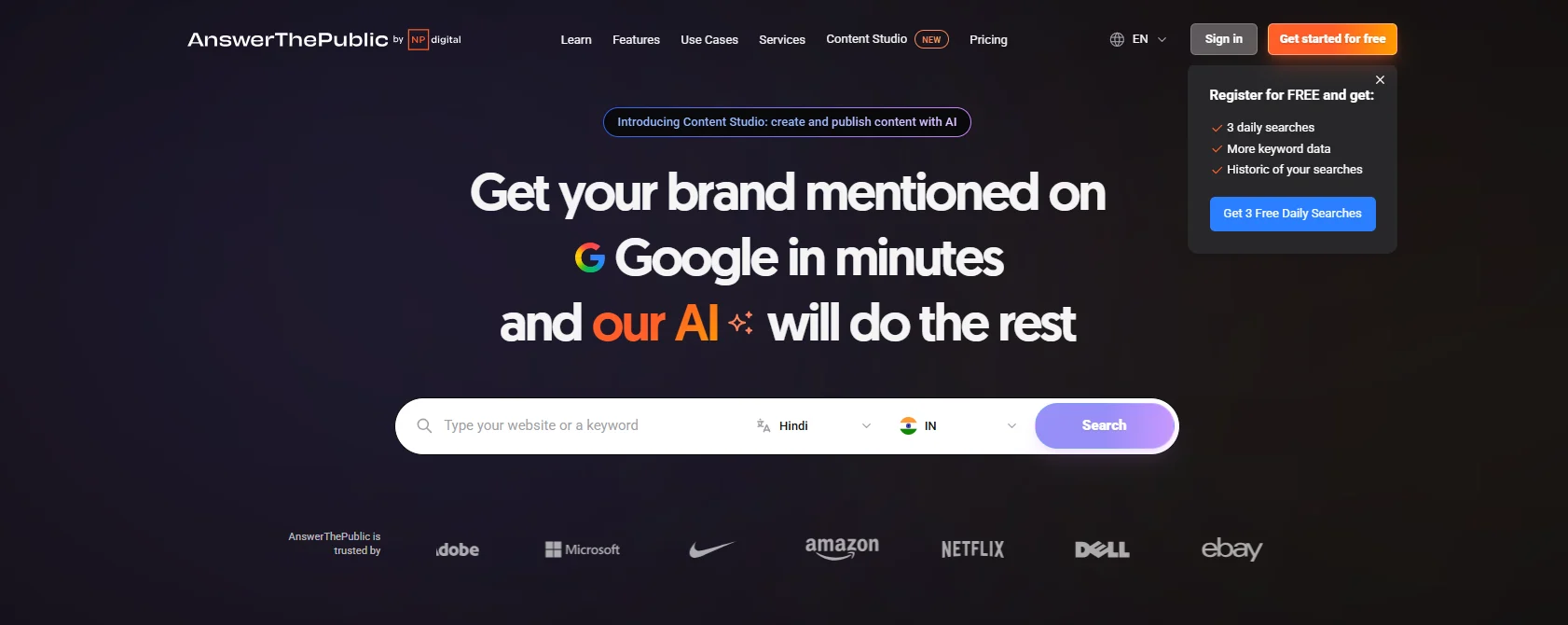
Step 1: Go to answerthepublic.com and log in
Open answerthepublic.com and create a free account, or log in if you have one. The free account gives you 3 searches a day, plus more keyword data and a history of your past searches. Three isn’t many, so plan them before you start typing.
Step 2: Set your country and language
Pick these from the two dropdowns inside the search bar, before you type anything. The questions people ask change by market, so match the place your customers live. Check them every time. One of my screenshots still had Hindi and India selected from an earlier search, so for this run I switched to English and the United States, the market I was researching.
Step 3: Search one seed keyword
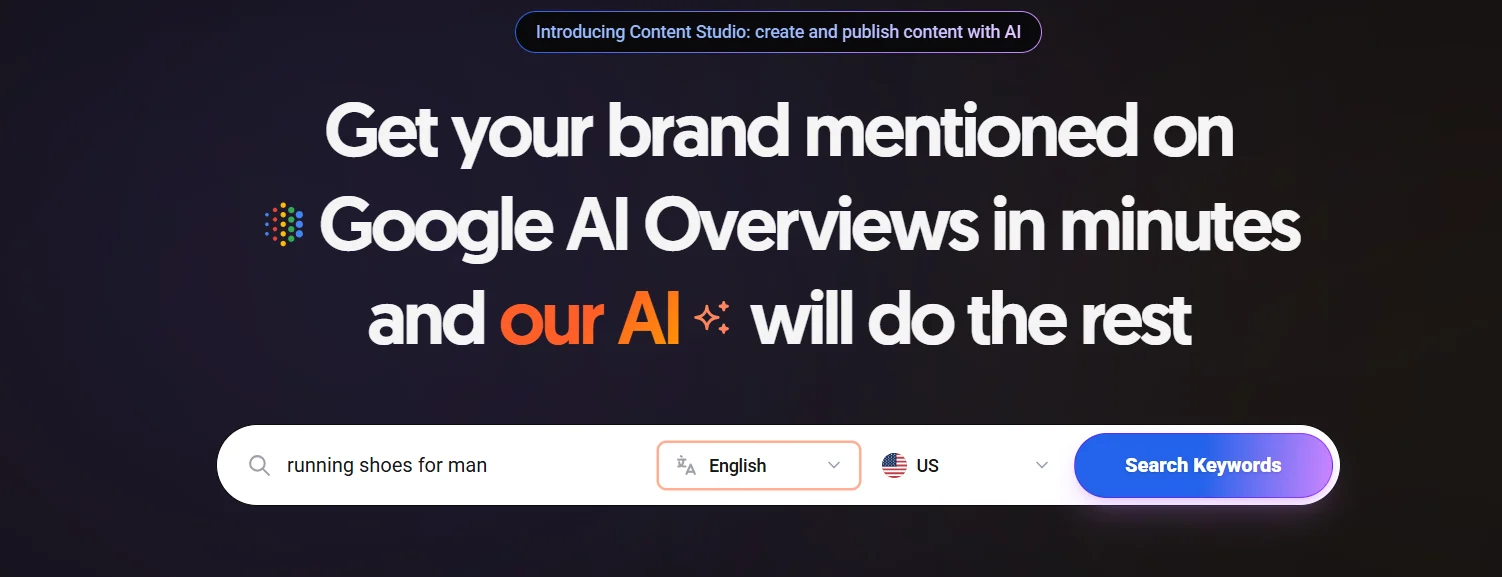
Type one seed keyword of two to four words that describes what you sell, then click Search Keywords. Inside your dashboard the same button is called Search all.
- Good: “running shoes for man”, “link building service“
- Too broad: “shoes”, “SEO”
- Too narrow: “best running shoes for 300 lb man size 15” (that’s a result you want to find)
Three free searches go fast, so decide all of them before you start:
| Search | What to type | My example |
|---|---|---|
| 1 | Your broad seed | running shoes for man |
| 2 | The strongest cluster from search 1, the one with the most rows or the clearest buying intent | running shoes for heavy men |
| 3 | A product or brand comparison your buyers make | hoka vs asics |
Search 1 gives you the full map. Searches 2 and 3 dig into the parts that make money. The first tab of the template has this plan ready to fill in.
Step 4: Read the results section by section
AnswerThePublic shows the same keyword in several views. Here is what each one gives you:
| Section | What it shows | What I build from it |
|---|---|---|
| Organic searches | Variations with volume and CPC. My seed showed 9.9K monthly searches and a $1.31 CPC | Product and list pages |
| Search wheel | Keywords grouped by where people search: search engines, AI models, social media and shopping | A view of which channels your topic lives on |
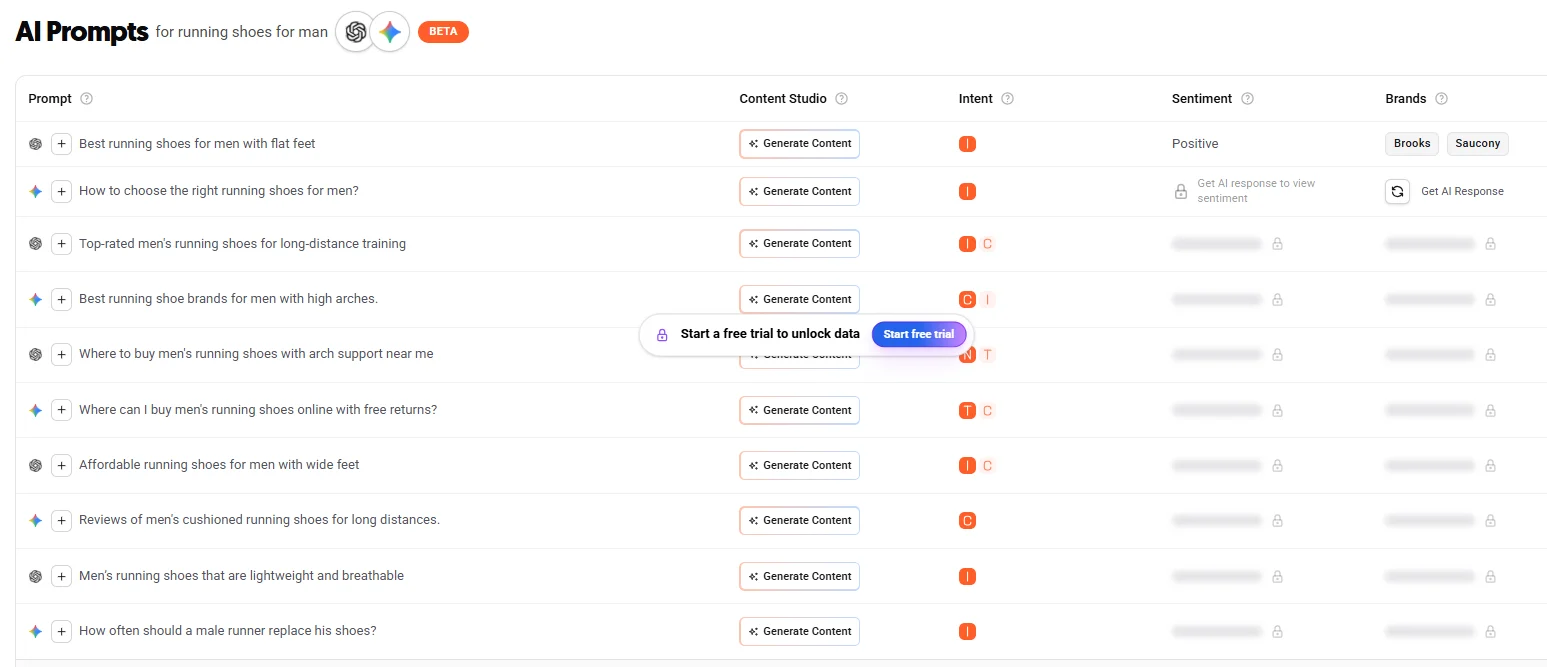
| AI Prompts | Questions people ask ChatGPT and Gemini, already tagged with an intent letter | Topics for AI search (GEO) and FAQ sections |
| People Also Ask | Questions Google already shows, like “Is Hoka or Asics better?” | Comparison posts and subheadings |
| Search modifiers | How, which, vs, for, with | Guides, “vs” posts, pages for one type of buyer |
Hover over any slice of the wheel to see its volume and CPC. “Best running shoes for man” showed 30 searches a month and a $1.54 CPC, a small number on its own and a good page title once you group it with its neighbours.
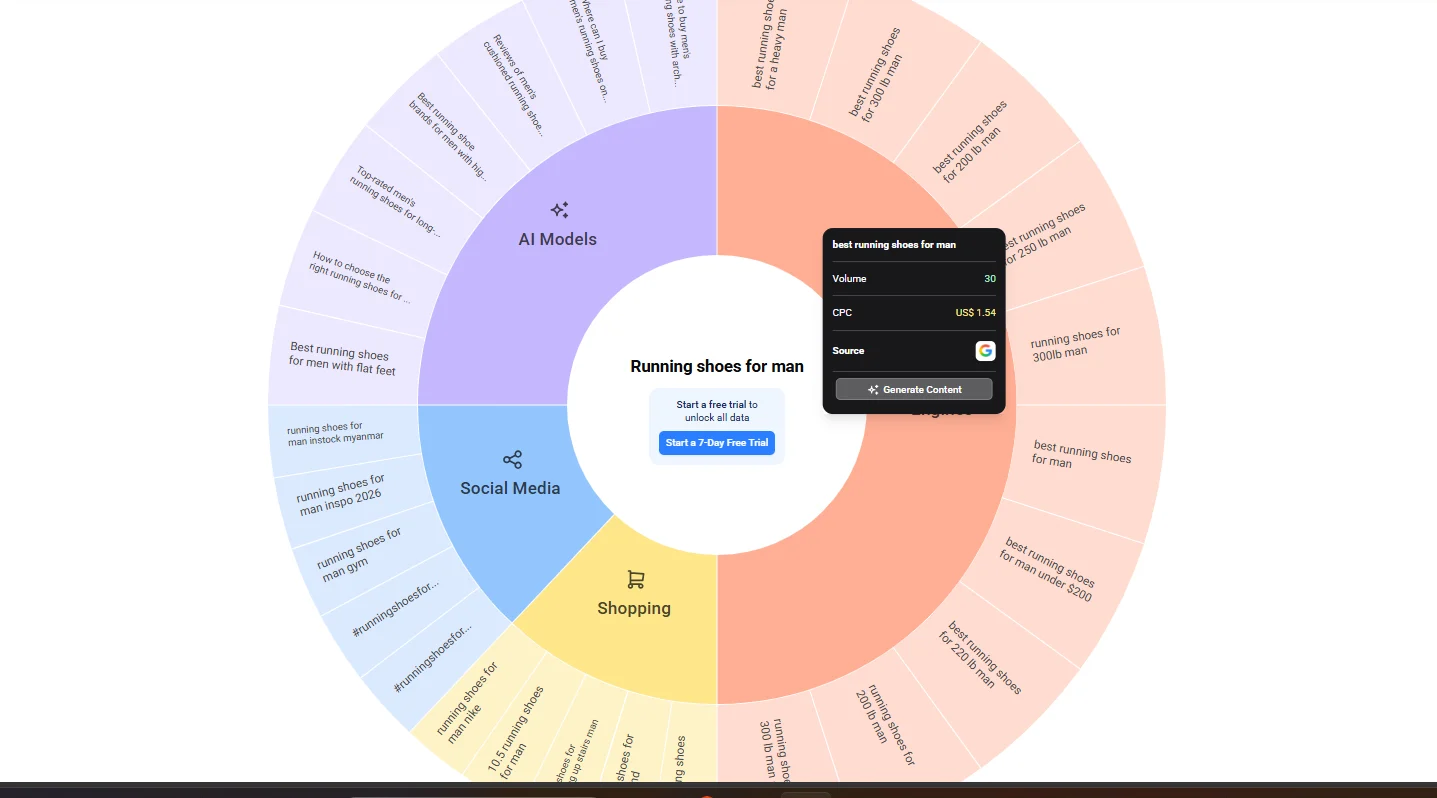
Most long-tail rows show tiny or zero volume like this. Keep them anyway. Small sites win on exactly these, and one good page can rank for dozens of them at once.
The AI Prompts table is the newest part of the tool, and most AnswerThePublic guides skip it. It lists real questions people put to ChatGPT and Gemini, like “How often should a male runner replace his shoes?”, with an intent letter next to each one: I for informational, C for commercial, N for navigational and T for transactional. Some columns, like sentiment and brands, sit behind the paid trial, but the prompts and intent tags are visible on the free account.
Step 5: Export everything as CSV
Click Export on each section and choose CSV. I came away with two files, the full keyword list and the People Also Ask tree. Skip the image and PDF options. Claude can’t sort a picture. If you use the template, paste the keyword, volume and CPC columns from every file into tab 2. It removes the duplicates across files for you.
Step 6: Upload the CSVs to Claude and tag the search intent
Open a new chat in Claude, upload the CSV files and paste this prompt:
I've uploaded AnswerThePublic exports for [seed keyword].
My site is [URL] and it sells [product] to [audience].
Remove duplicates and keywords that don't fit my business.
Tag every keyword as informational, commercial or transactional,
group them into topic clusters, and suggest the page type that would rank.
Return one table: keyword, intent, cluster, page type.
Search intent is the reason someone typed the keyword. It decides the page type, and the wrong page type won’t rank however well it’s written:
| Intent | The searcher wants to | Example from my run | Page to build |
|---|---|---|---|
| Informational | learn | how to choose running shoes | Guide |
| Commercial | compare before buying | best running shoes for flat feet | List or comparison |
| Transactional | buy now | buy running shoes online | Product or category page |
Skim the table Claude returns and fix anything that looks off. If a keyword also appeared in the AI Prompts table, compare Claude’s tag with the letter AnswerThePublic gave it. When the two disagree, check the Google results for that keyword before you decide. A wrong tag here turns into a wrong page later. Then paste Claude’s table into tab 3 of the template. It lists any keywords Claude dropped, so you can check none went missing by mistake.
Step 7: Check the competition gap on Google
AnswerThePublic tells you what people search. It can’t tell you who you have to beat, so you check the real results page yourself.
Pick the 15 to 20 keywords that matter most to your business. Google each one in a private window set to the same country, and look at the top 10 results. You’re looking for a competition gap, meaning signs that the current results are weak:
- Reddit or Quora threads in the top five
- Posts nobody has updated in two years or more
- Thin pages that answer the question in one paragraph
- Results that miss the intent, like product pages ranking for a “how to” question
Write a one-line note for each keyword. When a Reddit thread sits at number three, Google is telling you nobody has written the proper answer yet.
The Gap checker tab in the template does the scoring for you. Pick Y or N for each weak sign, rate how well the keyword fits your business from 1 to 3, and paste the URL if you already have a page on it. The sheet weights the signs, so a Reddit thread in the top five counts for more than an old post. Then it works out a priority score and tells you whether to write a new page, update the one you have or park the keyword for later.
Step 8: Score the gaps with Claude
Paste your notes into the same Claude chat with this prompt:
Here are my notes on the top 10 Google results for each priority keyword.
Score each keyword easy, medium or hard based on the weaknesses I found.
Sort the list so the easiest keywords with buying intent come first.
My rule of thumb: two or more weak signs make a keyword easy. A first page full of big brands with fresh, detailed content is hard, so park it for later. If you use the template, its Write next tab already sorts your list by priority, so you can copy it straight into Claude for the next step.
Step 9: Ask Claude for a 30-day roadmap
Claude now has your topics and your competition notes in one chat. Send this prompt. It’s the exact one from my reel, typos included:
Check these keywords, suggest a 30 days content roadmap for my website
that help me to cover all these topics in detail to establish topical
authority around this topic on my website and also help me with their
internal linking structure.
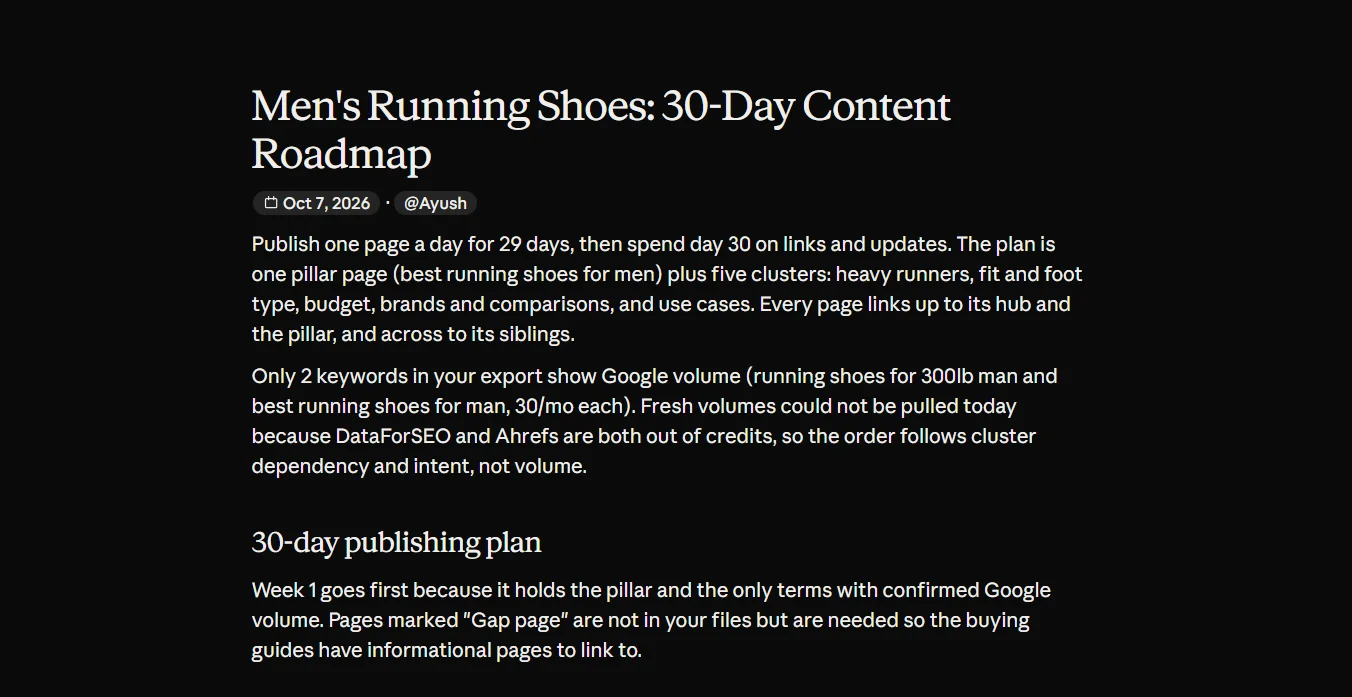
For running shoes, Claude planned one pillar page (“best running shoes for men”) and five clusters around it. Heavy runners came first, then fit and foot type, budget picks, brand comparisons and use cases. The schedule was one page a day for 29 days, with day 30 saved for links and updates. Each row listed the day, title, primary keyword, extra keywords it covers, page type and URL slug.
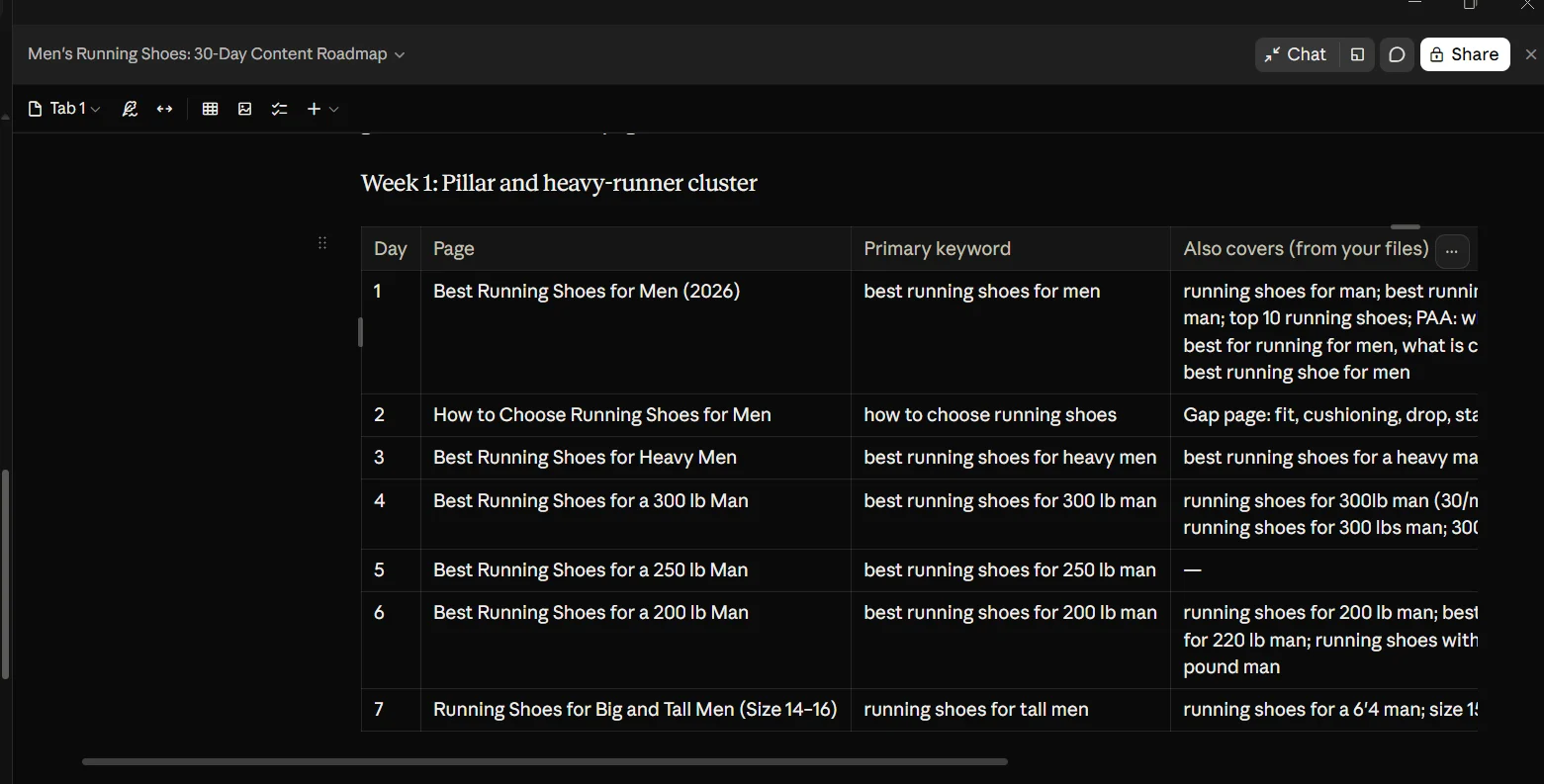
If Claude is connected to a keyword tool, ask it to pull current search volumes first. Mine tried through DataForSEO, but my credits had run out that day, so it ordered the plan by cluster and intent. The plan still held up.
Step 10: Check the roadmap before you accept it
Look at the order first. The pillar page must go first, since every other page links up to it. The easy commercial keywords from Step 8 belong in weeks one and two, because they bring buyers soonest. If either is wrong, ask Claude to reorder the plan.
Then look for gap pages. This was the part of my plan I didn’t expect. Claude added pages that weren’t in my AnswerThePublic files at all, like “Stability vs Neutral Running Shoes” and “When to Replace Running Shoes”, and marked them “Gap page”. Its reason: the buying guides needed informational pages to link to, or the clusters would have holes. Those exact phrases never showed up in my export, and the cluster still needs them.
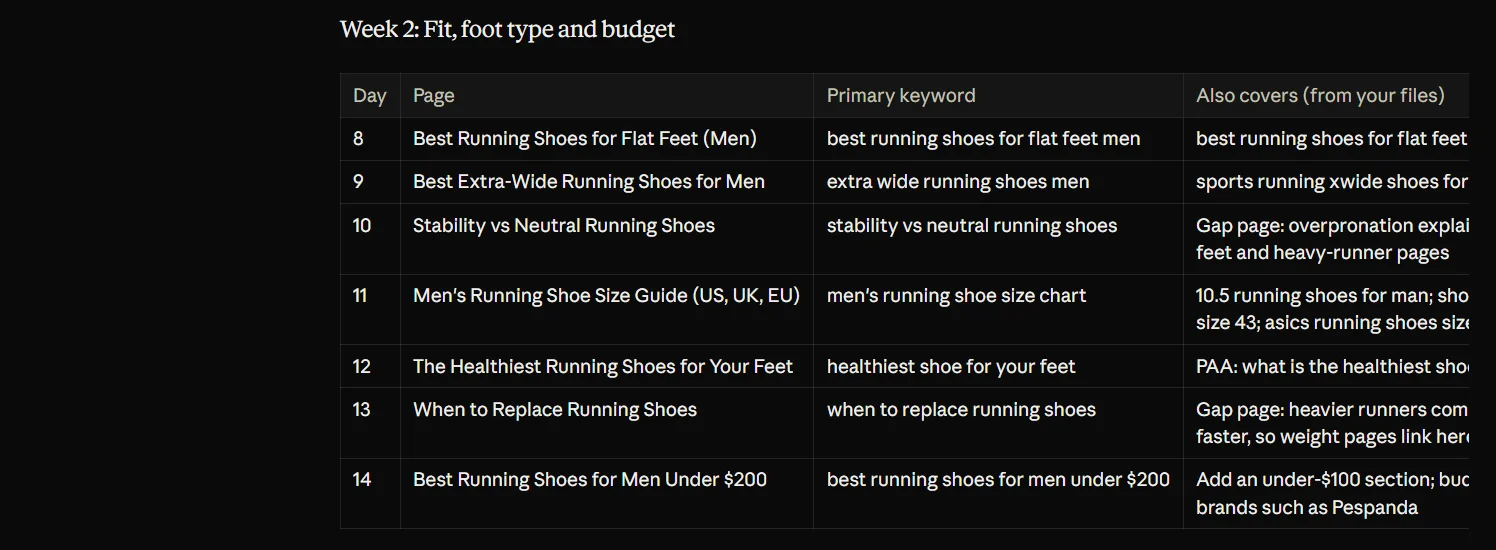
My full running shoes plan is on the example roadmap tab of the template. Your own roadmap tab fills itself from the Write next tab, one keyword a day. Write your page titles, put your pillar on day 1 and use the Status column to track each page from Planned to Indexed.
Step 11: Fact-check and publish one page a day
Claude can draft the pages, but check every fact before you publish. AI models predict likely answers and can state wrong ones with total confidence, which is why Google’s own guidance says to fact-check AI content. Add what only you have, like your photos, test results, client examples and real prices. Then publish one page a day, following the roadmap.
Step 12: Link every new page
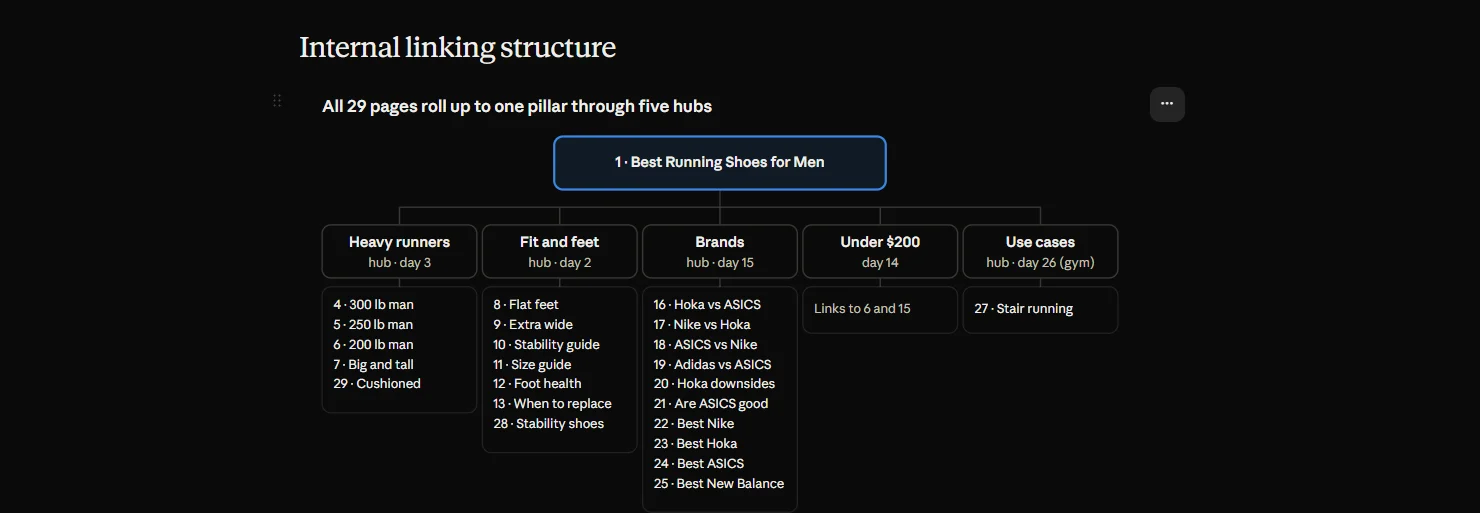
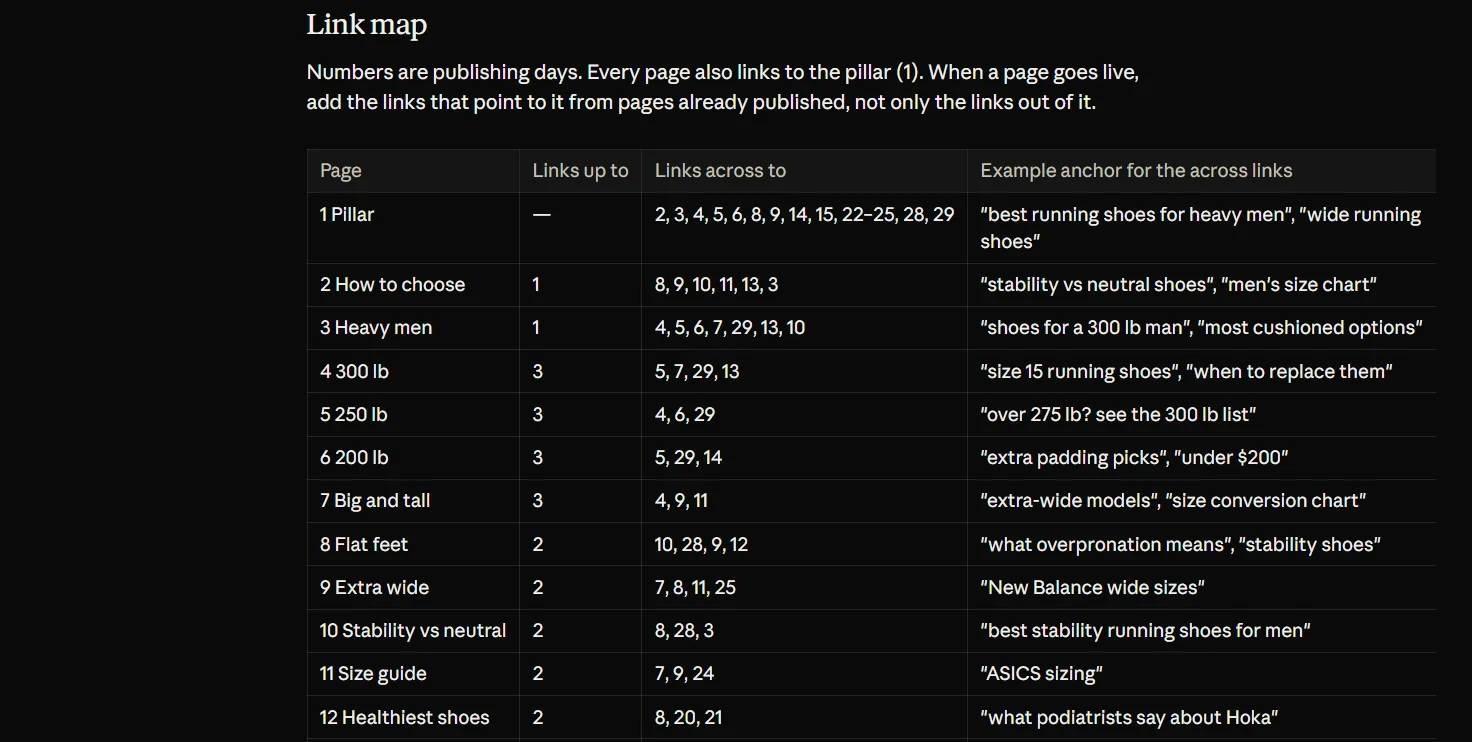
Wire the pages together using the link map Claude gave me:
- Every cluster page links up to the pillar
- Pages in the same cluster link across to each other
- Anchor text describes the target page, like “shoes for a 300 lb man”
- When a page goes live, add links to it from pages already published
That last rule is the one most people skip. A new page with nothing pointing at it is hard for Google to find.
Step 13: Submit each page to Google Search Console
Do this for every new URL:
- Open Google Search Console and paste the URL into the inspection bar at the top
- Click Test live URL
- Wait for “URL is available to Google”
- Click Request indexing
Google caps manual requests without publishing the number, so one page a day stays inside it. Submit your sitemap as well, so Google picks up anything you miss.
The results
Give it the full 30 days. The following month is when traction shows up, impressions in Search Console first, then clicks and visitors. This is the Search Console graph from a client site where I run this process. The client asked me to keep the domain private, so it stays out of the screenshot.
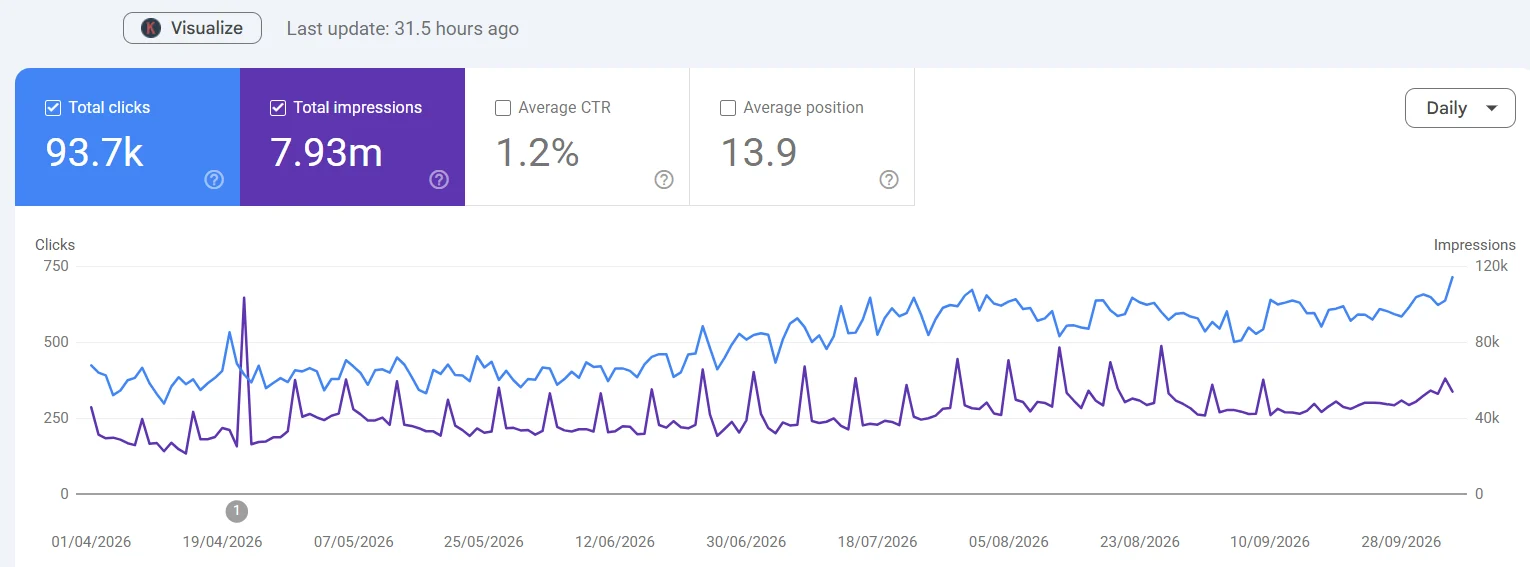
| Metric | Result |
|---|---|
| Total clicks | 93.7K |
| Total impressions | 7.93M |
| Average CTR | 1.2% |
| Average position | 13.9 |
The growth came from many small pages, each ranking for a cluster of long-tail questions and all linking to each other. No single viral page carried it.
To see whether it’s working for you, use the results tab in the template. Paste each page’s clicks, impressions and position from Search Console at 30 and 60 days, and it tells you which pages are growing and which need a refresh.
When this won’t work
I’d rather you hear this from me than find out 30 days in.
- If big brands own the entire first page for every keyword you check, Step 8 will mark them all hard. Search a narrower seed instead.
- Health, finance and legal topics need real expert authors. AI drafts with a quick fact-check won’t be enough there.
- If you skip the fact-checking in Step 11, you’re publishing pages that can rank for a while and then lose trust with readers.